STUDIO: design it, then actually print it
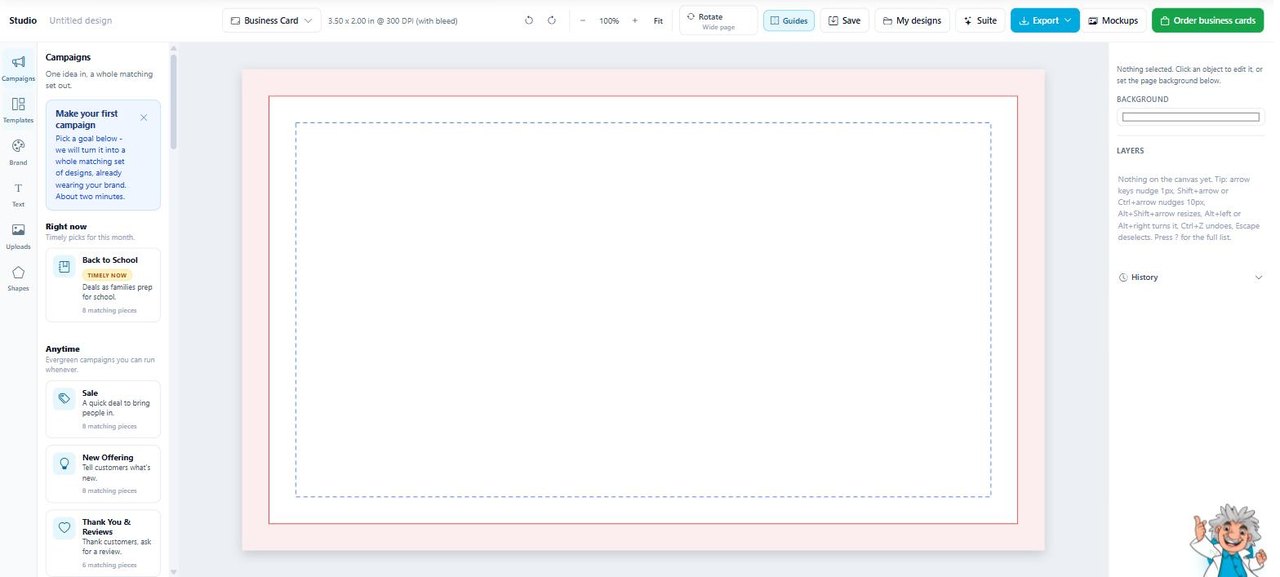
Most design tools stop at a pretty picture. STUDIO is set up like a press: true print size, bleed and safe area drawn on the canvas, and an order button when you are happy with it.
Create a free account to open STUDIOFree account. Email and a password, no card, ever.
What it does
STUDIO is a full design editor that runs in your browser. Templates, text, shapes, uploads, layers, undo history, the things you would expect.
The part you would not expect is Campaigns. Pick a goal, a sale, a new offering, a thank you, and it hands back a whole matching set of pieces, already wearing your colors and fonts.
Your Brand Profile feeds it, so you never start on a blank page and nothing comes out off brand.
Why people use it
- The canvas is the real thing. A business card opens at 3.5 by 2 inches at 300 DPI with bleed, not at some vague screen size.
- Campaigns turn one idea into a matching set instead of one orphan graphic.
- Templates already use your logo, your colors and your fonts.
- Mockups let you see the thing on a shirt or a sign before you commit.
- When it is right, you order it from the same screen. No exporting, no emailing files to a printer, no guessing.
- Ask us and a person looks at your file before it goes on press.
Who it is for
Owners who want to make their own stuff without learning Illustrator, and without ending up with a file the printer cannot use.
It is free, and it stays free
STUDIO comes with the free account. No trial, no card, no upgrade nag.
Create a free account to open STUDIO